Please note: Your ONS Certificate for the following courses will now serve as your provider card.
- ONS Fundamentals of Chemotherapy and Immunotherapy Administration™
- ONS Fundamentals of Chemotherapy and Immunotherapy Administration Renewal™
- ONS/ONCC® Chemotherapy Immunotherapy Certificate™
- ONS/ONCC® Chemotherapy Immunotherapy Certificate Renewal™
Follow these steps to access your course certificate and/or print your Provider Certificate.
- Log into your Learner Dashboard using your ONS Username and Password
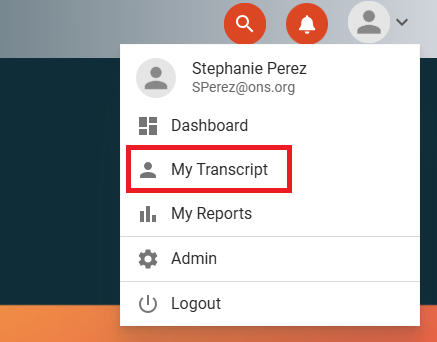
- Click on the Person Icon in the top right side of the screen to display the drop-down options
- Click on My Transcript
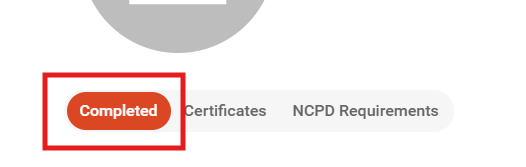
- Click on the Completed tab
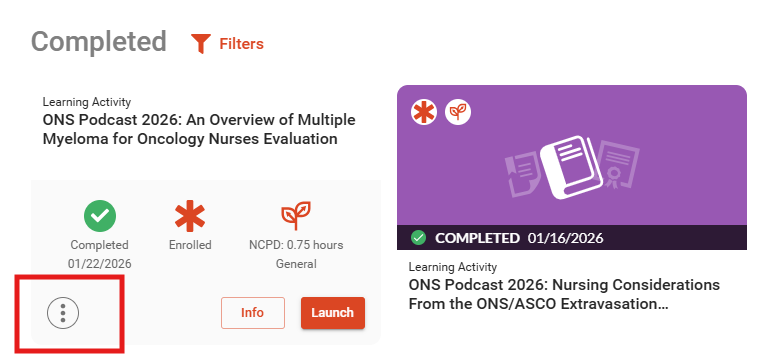
- After selecting "Completed", hover over the activity and then click on the three dots in the lower left corner.
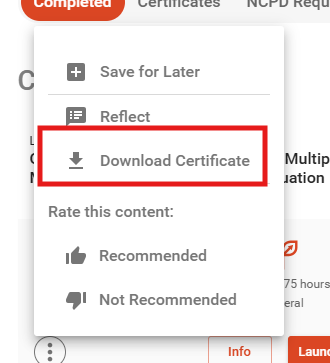
- Click Download Certificate. You may now print or save the certificate after downloading it.
If you require additional assistance, please contact ONS Customer Relations at help@ons.org or at 866-257-4667, option 2. You can also reach us by selecting "Submit a Ticket" within the ONS Help Center. Business hours are Monday through Friday, 8:30 am–5 pm EST.
Was this article helpful?
That’s Great!
Thank you for your feedback
Sorry! We couldn't be helpful
Thank you for your feedback
Feedback sent
We appreciate your effort and will try to fix the article